10 Best AI Image Enhancers for 2026: Tested Tools, Real Results, and the Smartest Pick
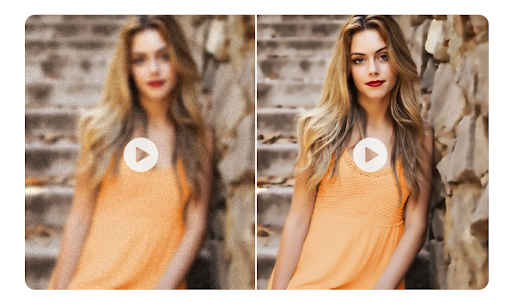
In 2026, “good enough” images don’t really exist anymore. Whether you’re restoring old family photos, polishing product images for an online store, or upgrading visuals for social media, people expect clarity, clean details, and natural-looking faces.
That’s why an AI photo enhancer has become a daily tool, not a niche one. The best enhancers today do more than sharpen—they reduce noise, rebuild missing texture, recover facial detail, correct lighting, and upscale images without that fake “plastic” look.
Below is a practical guide to the best tools, what they do well, and how to pick the right one for your use case.
What an AI Image Enhancer Actually Does in 2026
A modern AI Photo Enhancer uses trained models to reconstruct detail, not simply stretch pixels. The best tools can:
- Upscale images to higher resolution while keeping texture believable
- Restore faces (eyes, skin texture, hair strands) without “AI artifacts”
- Reduce noise and blur in low-light photos
- Repair older photos (scratches, fading, color issues)
- Batch-process folders for speed and consistency
One big trend in 2026: many platforms now separate models by use-case—portraits, old photo restoration, product clarity, and denoise—so you get more consistent results than “one model for everything.”
How I Compared These Tools
Instead of judging by marketing screenshots, compare tools the same way you’d use them in real life:
- Portrait realism (no weird eyes/skin)
- Upscale quality (does texture look real?)
- Speed + batch processing
- Ease of use (beginner-friendly vs pro control)
- Best use case (portraits, eCommerce, old photos, creative work)
1) HitPaw FotorPea (Best for Most People in 2026)
If you want strong results with almost no learning curve, HitPaw FotorPea remains one of the easiest “upload → enhance → download” workflows. The big win is that it generally keeps faces looking human instead of over-smoothed.
Best for: old photos, portraits, quick upscaling, beginners
Why it stands out: simple interface + strong face/restore models
What to watch: like most consumer tools, you’ll want to test a few photos before committing to a plan.
2) Fiverr (Best for “Important Images” That Must Look Perfect)
Fiverr isn’t a single enhancer—it’s a marketplace where editors often combine AI upscaling with manual retouching. That “human-in-the-loop” approach is perfect for brand images, product hero shots, or headshots where details matter.
Best for: headshots, brand work, product listings, high-stakes edits
Pros: custom results, human judgment, very polished output
Cons: not instant; quality depends on seller
3) Imogen (Best Mobile-First Enhancer for iPhone Workflows)
If your photos live on your phone and you want quick, subtle improvements, Imogen is a solid pick. Many mobile enhancers overdo skin smoothing—Imogen tends to keep results more natural.
Best for: selfies, lifestyle photos, fast content
Pros: quick workflow, natural output
Cons: iOS/macOS focus, subscription for heavy use
4) VideoProc Converter AI (Best Offline Tool for Privacy + Batch Restores)
If you prefer offline processing (privacy, client work, sensitive photos), VideoProc Converter AI is a practical option. It’s especially useful for folders of older, low-quality images.
Best for: old photos, blur/low-light repair, offline enhancement
Pros: privacy-friendly, batch features, restoration tools
Cons: desktop-only, not built for creative editing
5) Claid.AI (Best for eCommerce Product Photos)
Claid.AI is heavily aligned with product photography: clean clarity, better lighting balance, and marketplace-ready visuals. Great if you edit product images weekly.
Best for: eCommerce sellers, catalog images, marketplaces
Pros: optimized for product shots
Cons: not ideal for portraits or family photos
6) AdCreative.AI (Best for Marketers Who Need Ad-Ready Visuals)
AdCreative.AI is mainly an ad platform, but its upscaler is useful for improving image quality for banners, promos, and marketing creatives.
Best for: ads, marketing graphics, quick resolution upgrades
Pros: fast, designed for marketing workflows
Cons: not a portrait-first tool; pricing can be high for casual users
7) Luminar Neo (Best Pro-Level Enhancer With Creative Control)
Luminar Neo is for people who want results that look “studio finished,” and you’re willing to use sliders and creative tools. Great output, but not one-click simple.
Best for: photographers, creators, pro-level editing
Pros: high-end results, lots of control
Cons: learning curve; slower workflow than simple enhancers
8) Dezgo (Best for Experimenting With Text-Prompt Enhancements)
Dezgo is more of a creative playground. You can experiment with prompt-based edits and enhancement tools, but it’s not the most consistent for faces.
Best for: creative edits, experimentation
Pros: flexible, prompt-based options
Cons: inconsistent portrait results
9) Phot.AI (Best “All-in-One” Online Editor for Quick Fixes)
Phot.AI combines enhancement with extras like background edits and object removal. Good if you want one online dashboard for multiple tasks.
Best for: quick edits + enhancement in one place
Pros: multi-tool platform
Cons: complex edits can reduce texture quality
10) LetsEnhance (Best Credit-Based Upscaling for Simple Workflows)
LetsEnhance is widely used for quick upscaling and enhancement with a credit system and subscription options described on their pricing page (including how credits roll over on certain plans).
Best for: fast resolution upgrades, simple batch needs
Pros: easy workflow, clear credit logic
Cons: aggressive filters can distort faces if pushed too far
How to Choose the Right Tool (Quick Guide)
Pick based on your main goal:
- Old family photos + faces: HitPaw FotorPea / VideoProc Converter AI
- Product photos: Claid.AI
- Ad creatives: AdCreative.AI
- Professional editing control: Luminar Neo
- One-off important images: Fiverr
- Simple upscale credits: LetsEnhance
Final Takeaway
The best tool isn’t the one with the most features—it’s the one that matches your most common photo type and gives natural results without extra work. If you want a reliable, everyday AI photo enhancer for 2026 that works for most people (portraits + old photos + general clarity), start with HitPaw FotorPea, then keep one “specialist” tool in your backup list (Claid for product photos, Fiverr for premium manual polish, or Luminar for pro edits).






