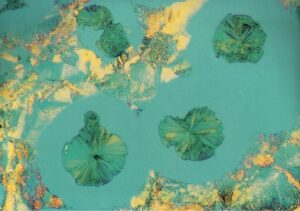
How to Edit Your Photos to Look Like Wolfgang Tillmans
If you’ve ever looked at Wolfgang Tillmans’ photography, you know it feels raw, emotional, and almost effortless. His style captures everyday life in a way that turns the ordinary into something powerful. Many people wonder how to edit your photos to look like Wolfgang Tillmans, and the good news is, it’s more about approach than fancy tools. His work often plays with natural light, subtle colors, and honest imperfections. In this guide, we’ll explore simple editing techniques and creative choices that can help you bring a similar artistic touch to your own photos without overcomplicating the process.
Who Is Wolfgang Tillmans and Why His Photography Stands Out
Wolfgang Tillmans is a German artist who reshaped the way people think about photography. Starting his career in the 1990s, he quickly became known for pushing the boundaries of visual art. Instead of relying on polished perfection, photographer Wolfgang Tillmans focuses on capturing moments as they truly are—unfiltered, emotional, and deeply human.
His work often plays with the balance of light and shadow, weaving in subtle colors that make even simple scenes feel powerful. He also uses unconventional angles and embraces imperfections, which give his images a raw, authentic touch. More importantly, his photos carry an emotional atmosphere that makes viewers feel connected to the subject.
Editing Your Photos Like Wolfgang Tillmans – Core Techniques
To bring the feel of Wolfgang Tillmans Photography into your own work, it helps to focus on three main areas: light, composition, and imperfection. These are the building blocks of his visual style.
Light and Color
Tillmans often uses light in a very natural yet emotional way. Instead of dramatic filters, think about soft adjustments, slight changes in brightness or saturation that create mood without looking artificial. Background hues also matter. A gentle shift in tones can completely change how your photo feels, turning something ordinary into something memorable.
Composition
Forget the rule of thirds for a moment. Tillmans loves to break traditional rules by using asymmetrical frames and irregular cropping. This approach gives his work an almost accidental beauty, as if the photo was captured in the middle of life unfolding rather than staged. Try experimenting with unusual angles or leaving extra empty space in your shots.
Imperfection
One of the most striking aspects of his style is the way he embraces flaws. Graininess, blur, or uneven lighting aren’t mistakes in his photos, they’re part of the story. Preserving these elements adds raw texture and honesty, making the final image feel more human and less polished.
How to Edit Photos with AI – A Modern Approach
Traditional editing often means spending hours adjusting brightness, contrast, and tiny details in photo editing software. While this manual process gives you control, it can also be slow and overwhelming, especially if you’re aiming to capture the mood of an artist like Wolfgang Tillmans.
This is where AI steps in. With just a few clicks, AI tools can rapidly change colors, adjust tones, or even shift the overall style and atmosphere of a photo. Instead of tweaking sliders one by one, you can let AI do the heavy lifting, helping you achieve a look that feels both professional and creative.
One such tool is Edimakor, which makes AI photo editing more accessible. It’s designed to quickly enhance images, adjust backgrounds, and experiment with different moods, without requiring advanced technical skills. For anyone who wants to blend the raw style of Tillmans with modern convenience, Edimakor offers a practical way to get started.
Traditional Editing vs AI Editing – Which Works Best for You?
Both traditional editing and AI-powered editing have their strengths. If you’ve ever struggled to balance endless sliders in photo editing software, you’ll see why AI feels like a breath of fresh air. Here’s a quick comparison:
| Feature | Traditional Editing | AI Editing |
| Time Needed | 3-4 hours of manual adjustments | Quick results in minutes |
| Control | Full precision over every detail | Smart automation with less manual effort |
| Learning Curve | Requires technical knowledge and practice | Beginner-friendly and easy to use |
| Creativity | Lets you experiment deeply but slowly | Instantly explores different styles and moods |
| Best For | Professionals who want maximum control | Creators who value speed and experimentation |
Transforming Photos with Edimakor AI Image Generator
If you want to blend creativity with modern technology, the best image editing software should feel simple yet powerful. That’s where the Edimakor AI Image Generator stands out. It offers three main features that align beautifully with Wolfgang Tillmans’ artistic style:
Text to Image
This feature allows you to turn words into visuals. Simply type a description, select a style, adjust basic settings, and let the AI generate an image for you. Whether you want abstract tones, soft lighting, or experimental effects, this mode is perfect for exploring Tillmans-inspired aesthetics.
Reference Image
Here, you can upload an existing photo and modify it with a text prompt. For example, you might upload a street shot and ask the AI to adjust the tone or atmosphere. The sliders let you control how closely the output follows the original. This is a great way to transform everyday Wolfgang Tillmans Photos into something new without losing their raw character.
Image Restyler
This mode focuses on changing the overall artistic style of your picture. After uploading your image, you can choose from a wide style library, cartoon, cyberpunk, realistic, ink painting, and more. It’s an easy way to experiment with textures, colors, and moods that mirror the unconventional spirit of Wolfgang Tillmans’ work.
Step-by-Step Guide: Using Edimakor AI Image Generator
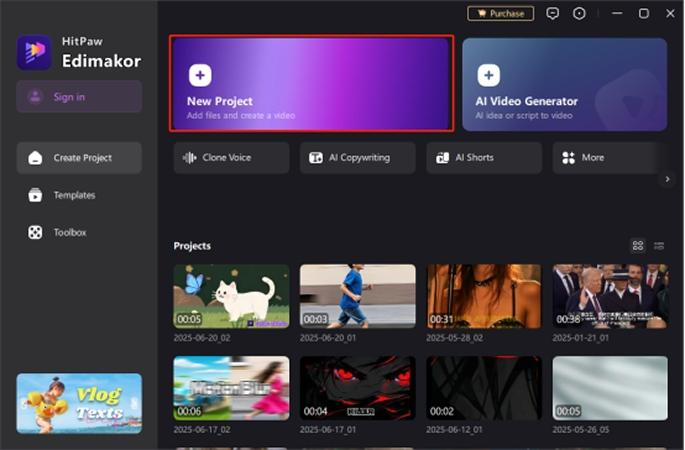
Step 1: Launch and Start a Project
Open HitPaw Edimakor on your computer. From the home screen, click “New Project” if you’re starting fresh, or select an existing project from the list to continue editing.
Step 2: Find the AI Image Tool
Inside the editing interface, look at the left sidebar and click on “AI Image.” You can also access options like Text to Image, Reference Image, and Image Restyler from the Toolbox.
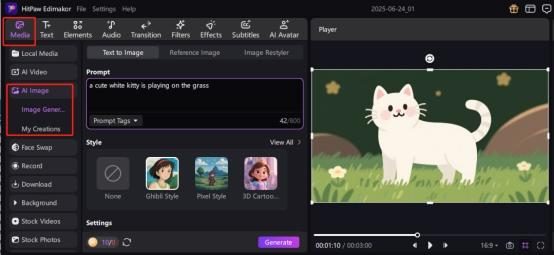
Step 3: Pick Your Editing Mode
Decide how you want to create:
- Text to Image for generating pictures from scratch with prompts.
- Reference Image to recreate or enhance an existing photo.
- Image Restyler to transform the style or mood of an image.
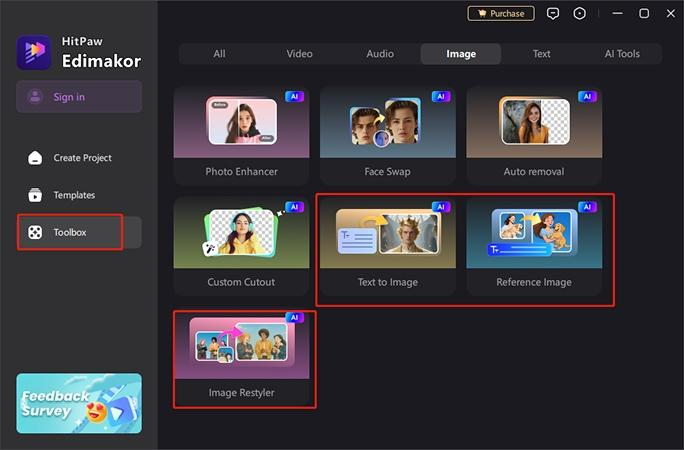
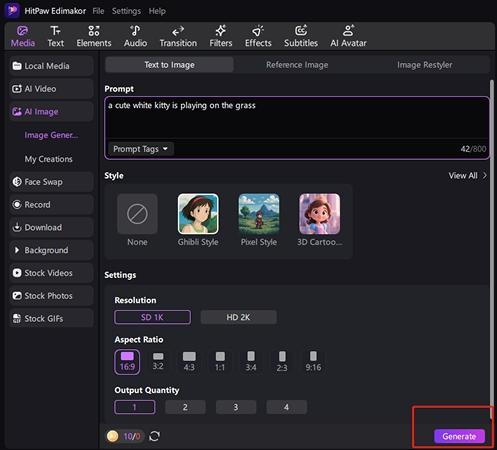
Part 2: Text to Image
Step 1: Write Your Prompt
Type a short description, for example: “A cute white kitten sitting on green grass.” The clearer your words, the better the results.
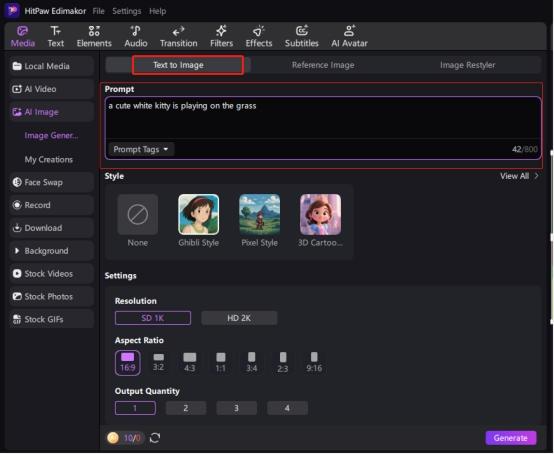
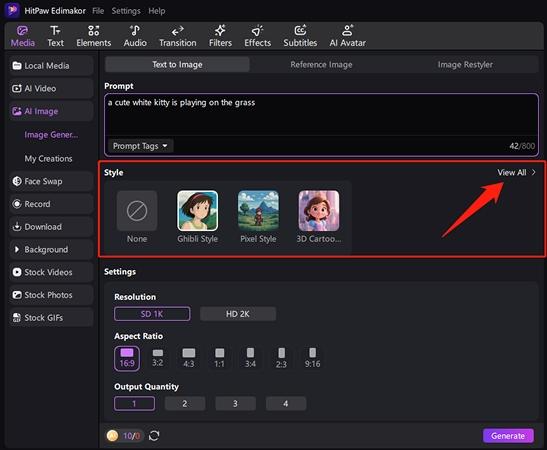
Step 2: Select a Style
Choose from creative presets like Ghibli, Pixel Art, or 3D Cartoon. Styles guide the look and mood of your final image.
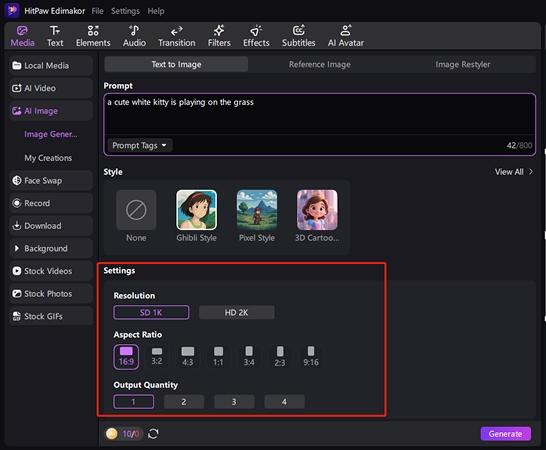
Step 3: Adjust the Settings
Set the aspect ratio (square, landscape, portrait) and choose how many variations you want to generate.
Step 4: Generate the Image
Click Generate and let AI instantly turn your text into an image. You can save or refine it further if needed.
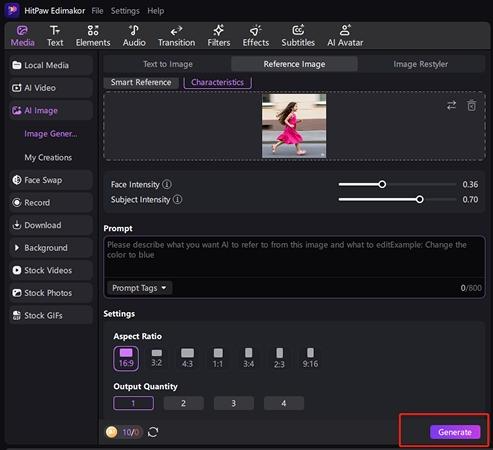
Part 3: Reference Image
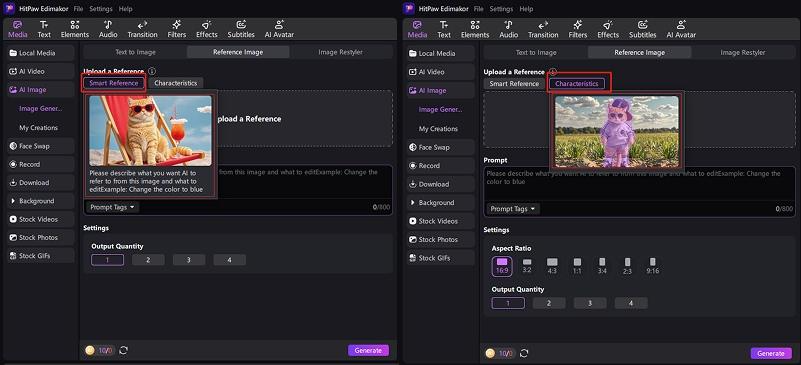
Step 1: Choose Your Mode
Pick Smart Reference (for AI to keep the main idea but polish it) or Characteristics (for stronger style influence).
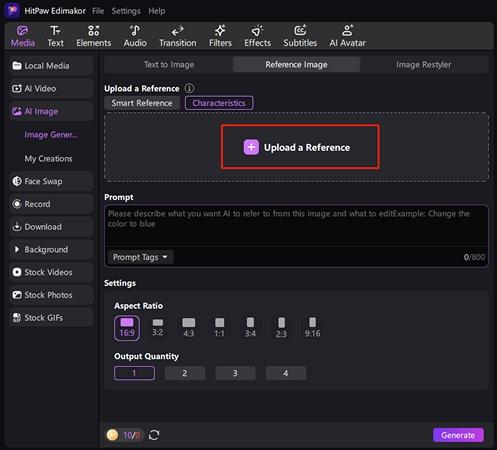
Step 2: Upload Your Image
Drag and drop your photo into the editor as a reference point.
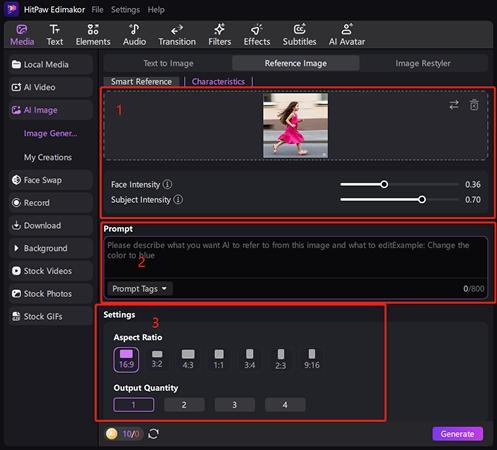
Step 3: Customize the Details
Adjust intensity sliders to control how much AI changes the photo. You can also add a supporting text prompt and set aspect ratio.
Step 4: Generate the Output
Click Generate to see your photo recreated with AI enhancements or new variations.
Part 4: Image Restyler
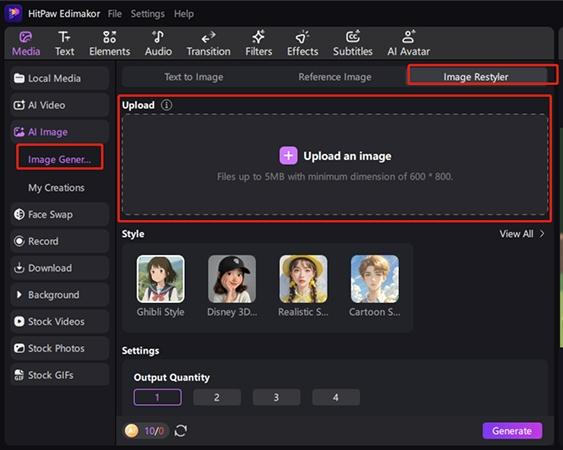
Step 1: Open the Restyler Tool
Go to the Image Restyler tab and upload the photo you want to modify.
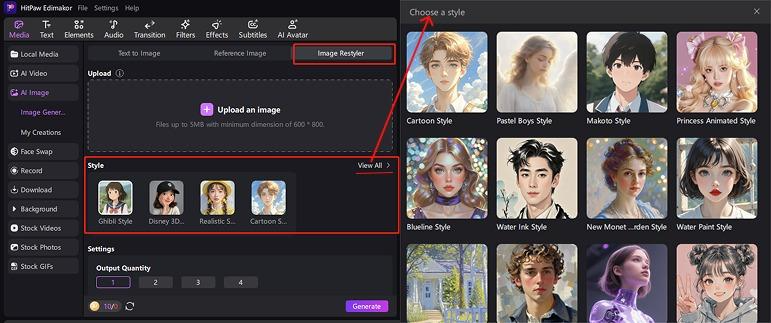
Step 2: Select a Style Preset
Pick from options like Cyberpunk, Realistic, Cartoon, Ink Style, or Watercolor. Each preset gives your image a fresh mood.
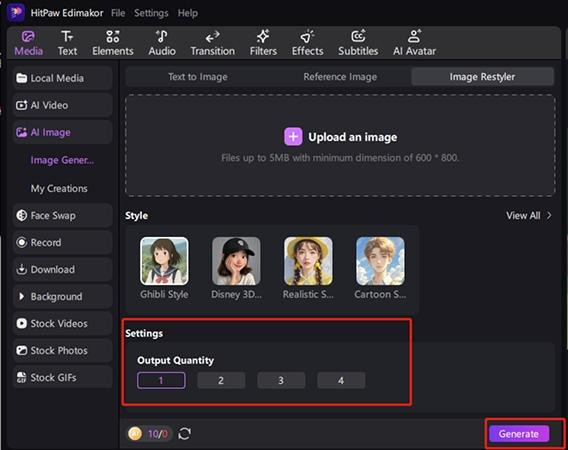
Step 3: Apply and Generate
Click Generate and watch as your photo is instantly reimagined in the style you chose.
Choosing the Best Laptop for AI Photo Editing
When working with advanced tools like AI photo editors, your laptop isn’t just a device—it’s the backbone of your creativity. A slow machine with poor color accuracy can ruin your editing flow. That’s why investing in the best laptop for photo editing is essential. The right hardware ensures smooth performance, accurate colors, and faster results when using software like Photoshop, Lightroom, or AI-powered editors.
Here’s a simple breakdown of what to look for in a laptop:
| Component | Minimum Requirement | Recommended for Professionals | Why It Matters |
| CPU | Intel Core i5 / AMD Ryzen 5 | Intel Core i7 / i9 or Apple M-series | Handles heavy editing tasks without lag |
| RAM | 16GB | 32GB or more | Smooth multitasking and large file handling |
| GPU | Integrated graphics (basic use) | Nvidia GeForce RTX / Dedicated GPU | Crucial for GPU-accelerated editing tools |
| Storage | SSD (512GB) | SSD (1TB or more) | Fast boot times and quick file loading |
| Display | IPS with good brightness | OLED/IPS with 100% sRGB coverage | Ensures color accuracy for professional edits |
Bring Wolfgang Tillmans’ Spirit into Your Work
At its heart, Wolfgang Tillmans photography isn’t about perfection, it’s about honesty. His work reminds us that freedom, spontaneity, and even flaws can carry powerful emotions. Grain, blur, or asymmetry aren’t mistakes; they’re part of the story. When you bring this mindset into your editing, you’re not just polishing photos, you’re shaping moments that feel alive.
The best approach is blending the traditional eye of a photographer with the possibilities of modern AI tools. While classic editing software helps with fine adjustments, AI-powered platforms make it faster and easier to explore Tillmans-like moods, colors, and textures.
If you’re eager to try this for yourself, the Edimakor AI Image Generator is a great starting point. With just a few clicks, you can recreate that raw, emotional spirit and experiment with the same sense of freedom that defines Tillmans’ photos.
Frequently Asked Questions
Q1: Who is photographer Wolfgang Tillmans?
A1: Wolfgang Tillmans is a renowned contemporary photographer celebrated for his experimental approach to light, color, and composition. His work consistently pushes the boundaries of traditional photography, redefining how we see everyday life through the lens.
Q2: What makes Wolfgang Tillmans photos unique?
A2: The distinctiveness of Wolfgang Tillmans photos comes from their fearless use of bold color, abstract framing, and an embrace of imperfections. Elements like grain, blur, and unconventional lighting aren’t polished away—they’re highlighted as part of the art.
Q3: How can I replicate Wolfgang Tillmans photography style?
A3: To imitate his style, experiment with natural light, adjust image background colors, play with asymmetrical or irregular composition, and allow imperfections to remain. The goal isn’t flawless execution but creating atmosphere and emotion.
Q4: Can AI tools help me edit photos like Wolfgang Tillmans?
A4: Absolutely! Learning how to edit photos with AI can make it easier than ever. Tools like Edimakor let you generate Tillmans-inspired visuals, restyle existing shots, and apply quick photo edits with AI-powered transformations.
Q5: Do I need the best laptop for photo editing to achieve this style?
A5: While having the best laptop for photo editing improves performance and ensures accurate colors, it’s not a strict requirement. Thanks to cloud-based AI editors like Edimakor, you can still create professional, Tillmans-inspired edits even on mid-range devices.