Upload Files Online: 7 Architecture Decisions That Matter

Every file upload looks simple from the outside: a button, a progress bar, a confirmation. But under that interface sits a series of architectural decisions that determine whether your system handles ten users or ten million. Get them right early, and your infrastructure scales gracefully; get them wrong, and you’ll rebuild under pressure.
For developers and system architects, jumping from a basic file handler to a production-ready system is like a structural rethink. This guide breaks down the seven decisions that matter most and why each one has consequences that compound over time.
1. Storage Strategy: Local Server vs. Cloud Object Storage
The first decision is deceptively simple: where do the bytes actually live? Many teams default to storing files on the same server running their application. It’s fast to set up, requires no external dependencies, and works fine in early development. However, the problems surface when you need to grow.
Vertical vs. Horizontal Scalability
Local storage ties your files to a single machine. When traffic grows, you can scale that machine vertically by adding more CPU and RAM. But that path has a ceiling and a high cost.
Horizontal scaling, adding more application server instances behind a load balancer, is the standard solution for high-traffic systems. Local file storage breaks this model entirely. If a user uploads a file to server A and their next request routes to server B, the file is simply not there.
S3-compatible cloud object storage (Amazon S3, Google Cloud Storage, and Cloudflare R2) solves this by decoupling file storage from your application servers entirely. Every server instance reads from and writes to the same storage layer. As a result, your application servers become stateless, and stateless servers scale horizontally without friction.
Data Durability and Redundancy
Local disk storage carries real risk. A hardware failure, a misconfigured deployment, or a full disk can permanently destroy user files. Cloud object storage services typically offer what the industry calls “eleven nines” of durability, which is 99.999999999%.
That figure means that the service is engineered to lose less than one file per 100 billion stored per year. They achieve this through automatic replication across multiple physical locations. This is the baseline expectation for any system wherein users trust you with their data.
2. Transfer Protocols: Standard HTTP vs. Specialized Upload Protocols

Storage decides where files go. Protocol decides how reliably they get there.
The Limitations of Standard Multipart/Form-Data
The default mechanism for browser file uploads is the multipart/form-data format sent over a standard HTTP POST request. For small files on stable connections, this works well. But for large files or unreliable networks, it has a fundamental flaw: the transfer is all-or-nothing.
If a 2GB upload stalls at 94% (dropped connection), the entire transfer fails and the user starts over from zero. There’s no native mechanism for the browser to resume from where it stopped.
Beyond user frustration, this creates real infrastructure strain. Partial uploads consume server resources, fill temporary storage, and generate error logs without producing any usable output.
Adopting TUS or Resumable Protocols for Reliability
The TUS protocol (Transloadit Upload Server) is an open standard that addresses this gap. It breaks a file into chunks and tracks upload progress server-side. If a connection drops, the client resumes from the last confirmed chunk rather than restarting the entire transfer.
This matters most for large files, mobile users on cellular connections, and users in regions with inconsistent infrastructure.
3. Security Architecture: Public vs. Private Ingestion
Allowing users to upload files online is effectively opening a door into your infrastructure. The architecture you choose around that door determines how much risk you accept.
Policy-Based Uploads and Signed URLs
The most common pattern routes every upload through your application server. The browser sends the file to your backend, and your backend forwards it to storage. This works, but it means your server handles every byte of every upload.
A more scalable and secure pattern uses pre-signed URLs or policy-based upload tokens. Your application server generates a short-lived, cryptographically signed URL and sends it to the browser. The browser then uploads directly to cloud storage using that URL, and your server never touches the file data.
The signed URL encodes permissions, expiry times, and file size limits. As a result, the storage provider enforces your rules without your server acting as an intermediary.
Note: A pre-signed URL is a time-limited URL that grants temporary permission to perform a specific action (like uploading a file) on a cloud storage bucket. It expires after a set period, typically seconds to minutes, making it useless after the upload window closes.
In-Transit vs. At-Rest Encryption
Encryption has two distinct phases in a file upload lifecycle. In-transit encryption protects data while it moves between the browser and the server, typically enforced via HTTPS/TLS. At-rest encryption protects data while it sits in storage, applied automatically by most cloud providers using AES-256 encryption.
Both matter for compliance. GDPR, HIPAA, and most modern data protection regulations require demonstrable encryption at both stages. Relying only on in-transit encryption leaves stored data exposed if the storage layer is ever compromised.
4. Edge Processing: Global Latency vs. Centralized Ingestion
Physical distance between your user and your server creates latency, and latency slows uploads.
Utilizing CDN Ingestion Points

A Content Delivery Network (CDN) typically serves cached content outward from edge locations close to users. Some CDN providers extend this capability to uploads. This allows files to enter the network at the location nearest to users rather than traveling to a central server.
For example, if your server is in Virginia and your user is uploading from Tokyo, the upload experience will suffer. In such cases, the difference can be several seconds of additional latency per request, compounding across large files.
Edge ingestion routes that upload into the CDN at Tokyo drastically reduce the distance the data travels over the open internet. The CDN then moves the data to its final destination over its own optimized backbone network.
Regional Data Residency Compliance
Where data physically resides is a legal question in many jurisdictions. For example, the GDPR requires that EU residents’ personal data stay within the EU or transfer only to countries with equivalent protections.
Therefore, your upload architecture must account for this from the start. Routing all uploads to a single US-based bucket may violate your compliance obligations for non-US users. The practical solution is configuring region-specific storage buckets and routing uploads to the appropriate bucket based on the user’s location.
5. Asynchronous Processing: Webhooks vs. Polling
Completed uploads are rarely the end of the story, as most systems need to do something with the file afterward. This may include scanning it for malware, generating thumbnails, transcoding video, or extracting metadata. How you handle that post-upload work shapes both your system’s performance and its reliability.
Decoupling File Processing from the Upload Request
The traditional approach runs post-upload processing synchronously. This means that the HTTP request stays open while your server scans, resizes, or transcodes the file. For small files, this is tolerable. For large files or complex processing, it leads to timeout errors, blocked server threads, and a poor user experience.
The production approach decouples processing from the upload request using message queues and webhooks. When an upload completes, your system publishes an event to a queue. Separate worker processes consume that queue and handle each processing task independently.
When a task finishes, the worker triggers a webhook to notify your application. The user’s upload request completes immediately, and processing happens in the background without blocking anything.
Handling Race Conditions in Database Updates
Asynchronous processing can introduce timing complexity. For example, two workers can process the same file simultaneously. Or, a webhook can arrive before your database has finished writing the upload record. In these cases, your system can end up in an inconsistent state, which is a race condition.
Common mitigations include idempotency keys (unique identifiers that prevent duplicate processing), database-level locking, and event ordering guarantees from your message queue. Designing for these scenarios upfront is far easier than debugging corrupted data records in production.
6. Content Transformation Architecture
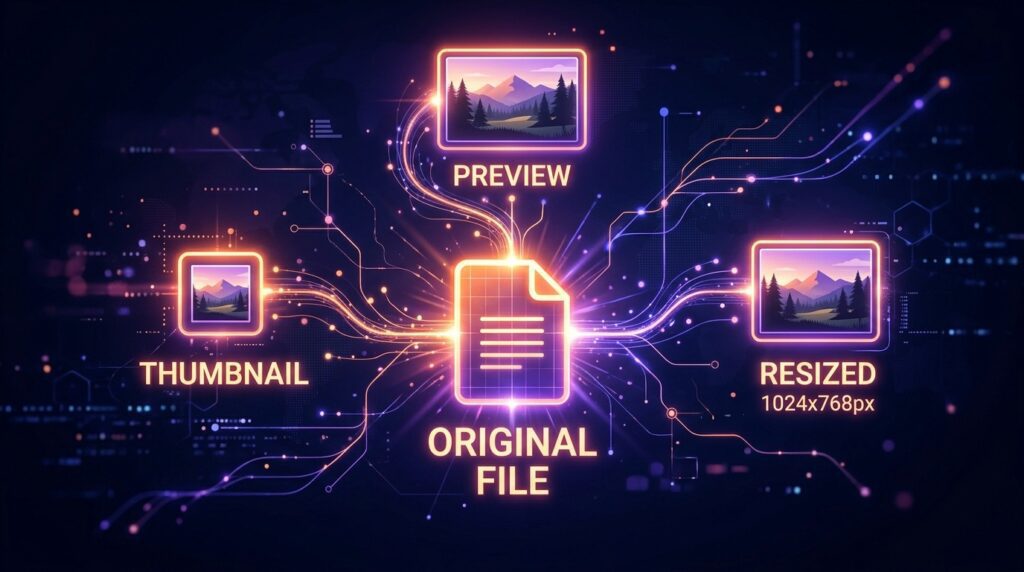
Most applications need files in more than one form. A profile photo needs a thumbnail, a video needs multiple resolutions, and a PDF needs a preview image. How and when you generate those derivatives is an architectural decision with real cost implications.
The Cost-Benefit of Real-Time Image Manipulation
On-the-fly transformation generates derivatives at request time. When a browser requests a thumbnail, the server creates it in that moment and serves it. This approach minimizes storage costs because you only store the original file.
The tradeoff is compute cost and latency. This is because every unique transformation triggers processing, and popular files can generate significant load.
At-ingest transformation runs all processing immediately after upload. You generate every required derivative upfront and store each one. Request time becomes trivial because the file is already prepared. The tradeoff is storage cost and the risk of generating derivatives nobody ends up requesting.
Most production systems combine both approaches. They generate the most common derivatives at ingest and use on-the-fly transformations for less frequent or unpredictable variants.
Managing Derivative Assets and Thumbnails
Every derivative you generate needs its own storage location, its own URL, and a reference in your database linking it back to the original. Without a consistent naming convention and a clear data model, derivative management becomes a maintenance problem that grows with your library.
A clean approach stores the original file and records its ID and storage path in your database. Each derivative stores a reference to the original ID plus a descriptor of the transformation applied. This structure makes it straightforward to regenerate derivatives if your transformation requirements change, without losing track of the originals.
7. Monitoring and Observability
A file upload system without monitoring is a black box. You’ll know something is wrong when users complain, but not before.
Tracking Success Rates and Latency Percentiles
The two most important metrics for an upload system are success rate and latency percentiles. The former refers to the percentage of successful uploads. On the other hand, the latter refers to how long uploads take at the 50th, 95th, and 99th percentile.
It’s important to note that averages can be misleading for latency. A system with a fast average but a slow 99th percentile is delivering a poor experience to a meaningful portion of your users.
Track these metrics broken down by file size, file type, user geography, and client type (browser vs. mobile app). Patterns in that segmentation reveal the actual source of problems far faster than aggregate numbers do.
Implementing Detailed Logging for Failed Upload Debugging
Every failed upload should generate a structured log entry that captures the following:
- File size
- File type
- Error code returned
- The stage at which the failure occurred
- The user’s network context where available
Generic error logs that record only “upload failed” don’t provide much value for diagnosing production issues.
Correlating these logs with your metrics gives you the ability to distinguish between a client-side, network, and server-side problem.
Conclusion
Building a system to upload files online is a solved problem, but only when you make the right structural choices early. Local storage, synchronous processing, and single-region architectures work at a small scale and can create compounding problems as you grow. Cloud storage, resumable protocols, asynchronous processing, and edge ingestion form the foundation of a system built to last.
Each decision in this guide connects to the others. Your storage strategy affects your security architecture. Your protocol choice affects your processing model. The earlier you treat these as interconnected system design questions rather than isolated implementation details, the less expensive they become to get right.
So, skip the infrastructure overhead. Explore Filestack’s file upload API and start a free trial to see how a production-ready architecture handles these decisions for you.
FAQs
1. Is it better to upload files directly to S3 or through an API server?
Direct-to-S3 uploads using pre-signed URLs are generally preferable for production systems. Your application server generates the signed URL and sends it to the browser. The browser then uploads directly to storage without your server handling any file data. This reduces server load, lowers bandwidth costs, and removes your backend as a bottleneck for large or concurrent uploads.
2. How do I handle very large file uploads online without hitting server timeouts?
Chunked, resumable uploads using a protocol like TUS mitigate the timeout problem. Because each chunk is a separate, small HTTP request, no single request runs long enough to trigger a timeout.
3. What is the most secure way to authenticate file uploads from a browser?
Use short-lived, policy-based tokens or pre-signed URLs generated server-side. These tokens encode specific permissions and are cryptographically signed so the storage provider can verify them without contacting your server. Never expose long-lived storage credentials to the browser.
4. Should I store file metadata in my database or with the file itself?
Store metadata in your database and reference it by the file’s storage path or unique ID. Embedding metadata in the file itself (via EXIF data or custom headers) makes it harder to query, update, and index.
5. How do webhooks improve the architecture of a file upload system?
Webhooks decouple the upload event from the processing work that follows it. Rather than blocking the upload request while your server scans or transforms the file, a webhook notifies your system when each processing task completes. This keeps response times fast, allows processing to scale independently, and makes retrying failed tasks better.
6. What are the legal considerations for data residency when users upload files online?
Data residency laws require that personal data stay within specific geographic boundaries or transfer only under approved conditions. GDPR, for example, applies to EU residents, and similar frameworks exist across many jurisdictions. Your upload architecture must route files to region-appropriate storage from the start. Migrating data between regions after the fact is technically complex, legally risky, and operationally expensive.






