Turning Reference Images into New Creative Concepts
You’ve probably done this before: found a photo you loved, saved it somewhere, and then had no real way to use it beyond “inspiration.” An AI image generator changes that entirely. Instead of just admiring a reference, you can feed it into a tool and walk away with something new that carries the same spirit but stands entirely on its own. Dreamina, running on its newest model Seedream 5.0 Pro, is one of the more capable options for this kind of work, and it’s worth understanding how the process actually plays out.
Why a reference image is a shortcut, not a crutch
There’s a lingering idea that using reference images somehow makes a creative process less original. In practice, it’s the opposite. A reference gives an AI model something concrete to anchor to, whether that’s a pose, a lighting setup, or a color story. From there, you’re free to push the concept somewhere the original photo never went. Think of it less as copying and more as borrowing a starting point.
What makes a reference image actually useful
Not every photo pulls its weight as a starting point. Some just don’t have enough to work with. A few things worth checking before you upload one:
- Is the composition clear, or is there too much going on?
- Does the lighting or mood have a distinct feel you’d actually want to keep?
- Can you tell the subject or pose apart at a glance?
If a reference is grainy, busy, or awkwardly cropped, the output tends to come out muddier too. So it’s worth spending thirty seconds picking a decent one before you even open the prompt box.
Meet Dreamina’s Seedream 5.0 Pro
Seedream 5.0 Pro is built with exactly this kind of transformation in mind. It handles precision editing through point selection, lasso tools, and sketch guidance, so you can nudge specific parts of an image without losing the rest of the composition. Its layer separation feature is especially handy here, letting you pull subjects, backgrounds, and text apart so each can be reworked on its own. Add native text rendering in 14 languages, built-in research for staying current on trends and details, and 2K output that holds up under close inspection, and you’ve got a model that treats a reference photo as raw material rather than a final answer.
Reference to concept: here’s the actual process
This part is honestly kind of satisfying once you get the hang of it. Below is how it works inside Dreamina.
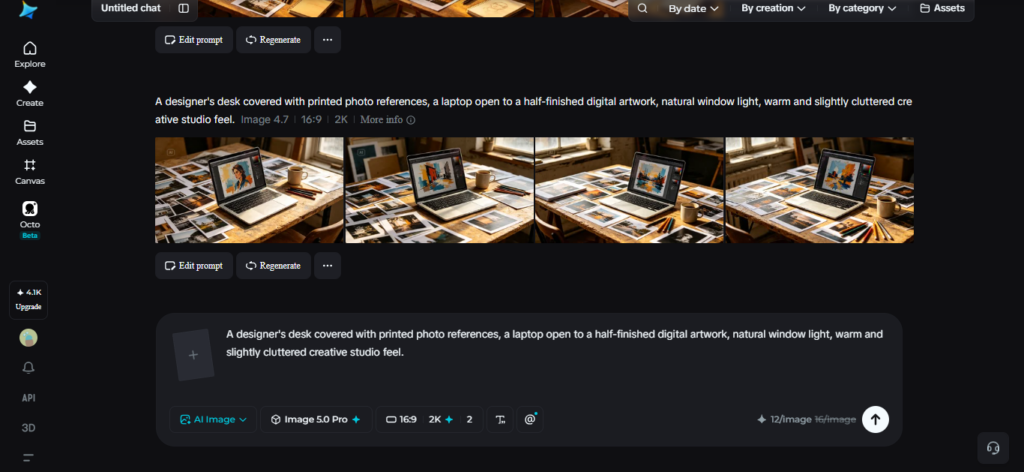
Step 1: Write a text prompt and/or add reference image
Open Dreamina and start typing out what you want, being as specific as you can about mood, setting, and subject. Then, if you have one, drop in your reference image alongside the prompt so the model has something visual to work from.
Say you’re reworking a portrait into a more editorial concept — you might write something like: “A striking editorial portrait inspired by the reference image, dramatic side lighting, muted color palette, subject looking slightly off-camera, fashion magazine energy, sharp focus on facial details.”
Step 2: Adjust parameters and generate
Don’t skip this part. Pick Image 5.0 Pro by Seedream 5.0 Pro as your model first. Then set the aspect ratio and size based on where this image is actually going to live — a banner needs different dimensions than a square post, obviously. Resolution comes next: 1K if you’re just testing an idea, 2K if this is the real thing. Once that’s set, tap Dreamina’s icon and generate.
Step 3: Customise and download
What comes out rarely needs zero tweaking, and that’s fine. Dreamina gives you inpaint, expand, remove, and retouch tools right there to smooth out anything that feels off or push the concept a bit further. Happy with it? Hit “Download”, and you’re done.
Reworking one reference into several moods
Here’s where things get interesting. A single reference doesn’t have to lead to a single output. Try running the same source image through a few different prompt directions:
- A moodier, low-light version for dramatic branding
- A brighter, saturated take for social-first content
- A stripped-back, minimal version for print
You end up with a whole family of visuals that all trace back to one starting point, which is a genuinely efficient way to build out a campaign.
Keeping things original while borrowing structure
There’s a fine line here, and it’s easy to cross without noticing. Use a reference for guidance, sure. But if the output looks like a near copy, you haven’t made anything new — you’ve just repainted the original. Change the setting. Swap the palette. Shift the subject’s expression or pose into something the reference never had. None of that takes much effort, but it’s usually the difference between “inspired by” and “basically the same photo.” Small, deliberate changes go further than people expect.
Where this approach works best
This technique tends to shine in a handful of situations:
- Rebranding old campaign photography without a new shoot
- Building mood boards fast during early concept work
- Adapting one hero image across multiple platforms and formats
Anywhere you’d normally reach for a mood board, this process can take you a step further and actually produce the asset.
Wrapping up
People have been pinning reference photos to mood boards forever. What’s changed is what happens after. Pair one with Dreamina and you’re not just staring at inspiration anymore, you’re shipping something built from it. Seedream 5.0 Pro does the heavy lifting in the background, and that photo you saved months ago and forgot about? It could be a finished concept in the time it takes to make coffee.